










Review requests
More reviews, asked for the right way.
Paste the customers you served. Each one gets a short thank-you from your business with a button to your review page. Nobody is asked twice in 90 days, and nothing is offered in return.
How it works
Four steps, about two minutes.
- 01
Add your review link
On Google, open your Business Profile, choose Ask for reviews and copy the link. A Facebook or Tripadvisor review page, or your own, works too.
- 02
Paste your customers
One per line: “Jordan Park, jordan@example.com”, “Name <email>”, or just the address. Straight from your booking app or till.
- 03
Check the preview
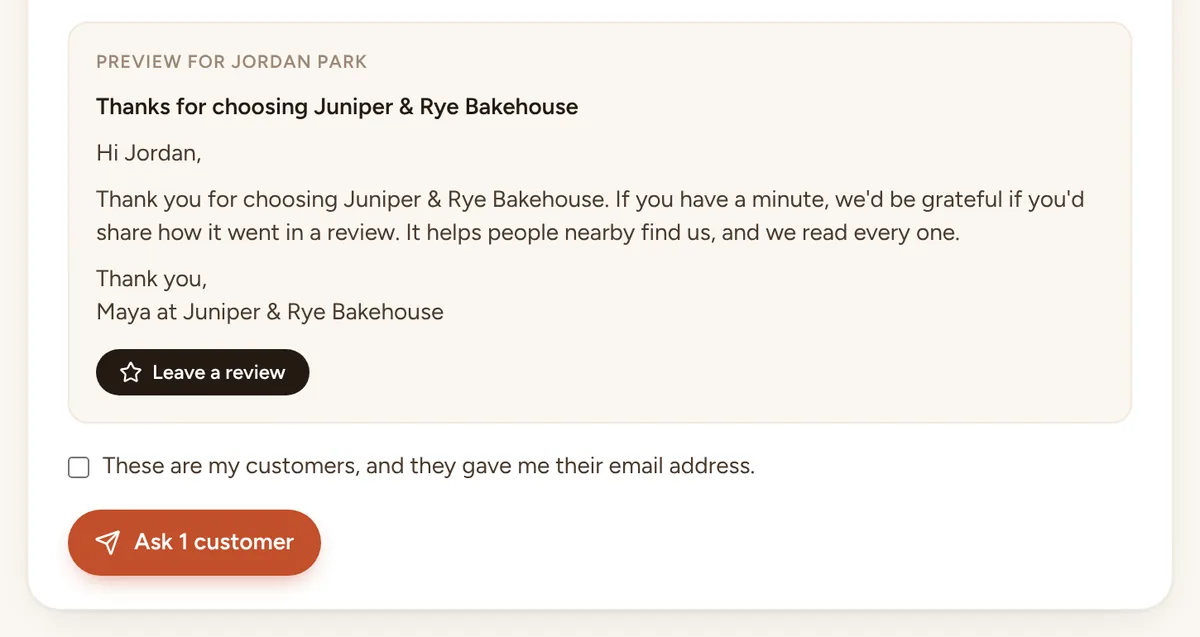
Each email starts with the customer's first name and is signed by you. Confirm these are your customers and they gave you their email.
- 04
Send
The emails go out over the next minute or two, from your business. You see who opened your review page.
The fair way
Built to the review sites' own rules.
A review that gets removed doesn't help anyone. So the review sites' rules are built in, and you can't switch them off by accident.
- The same message for everyone you list
- “Don't ask me again” in every email, and one-click unsubscribe in mail apps
- Nobody asked twice in 90 days
Townlight won't
- Won't: Ask only the customers you think were happy
- Won't: Offer a discount or a gift for a review
- Won't: Keep emailing someone who said stop
- Won't: Send before you confirm these are your customers
Then share the good ones
A kind review becomes your next post.
Paste a review into a Customer love post and Townlight quotes it word for word, with the stars and the customer's first name, on your own colors. Never edited, never invented.
See the review templateA real template with a made-up review.
Questions
About review requests
Which review sites work?
Why can't I ask only my happy customers?
How many can I ask at once?
Can I send texts instead?
Who on my team can send them?
Your happiest customers are waiting to be asked.
Start the free trial, paste your review link and send your first review requests today. Every email comes from your business, signed by you.